
Build a SolidJS Inventory App on SmallStack's API
💡 Prefer the big picture first? Read the one-page Solid × SmallStack story — what you get for free when SmallStack is your backend — then come back and build it.
SolidJS is small, fast, and JSX-familiar — with fine-grained reactivity
that a devoted community loves. This tutorial builds a full inventory app (login, dashboard, CRUD)
against a SmallStack backend using the bundled smallstack-sdk-js client and Solid's native
primitives: createSignal, createResource, and createStore. If you know React, watch how much
less wiring Solid needs.
What you'll build: token login + protected routes, a dashboard driven by SmallStack's server-side aggregation, an items list with search/filter/pagination, a create/edit form, and a "day-one" About page — all consuming one auto-generated REST API.
Prerequisites: Node 18+, and a SmallStack backend.
Ports:
| Service | Port |
|---|---|
| Django backend | 8050 |
| SolidJS (Vite) | 5173 |
Step 1: Backend — the inventory API
This track consumes the same inventory backend as the other tutorials. Stand it up (the React tutorial covers the Django side in full):
git clone https://github.com/emichaud/django-smallstack.git backend
cd backend && cp .env.example .env   # leave CORS_ALLOWED_ORIGINS empty (dev auto-allows localhost:*)
make setup                            # migrate + admin/admin
uv run python manage.py create_demo_user   # demo/demo, non-admin
make run PORT=8050
You want an Item CRUDView with enable_api = True, search_fields, filter_fields, and
api_aggregate_fields = ["quantity", "unit_price"]. Seed a few items and confirm
http://localhost:8050/api/docs/.
Step 2: Scaffold Solid + the bundled client
npx degit solidjs/templates/js frontend
cd frontend
npm install
npm install @solidjs/router
# Install the SmallStack client that ships with your backend (local path, no registry):
npm install ../backend/clients/js
Point the app at the backend — create frontend/.env:
VITE_API_URL=http://localhost:8050
No token here. The SDK logs in and persists the token in localStorage.
Step 3: The client + resources
Create src/lib/client.js — one shared client for the whole app. The SDK handles the
Authorization header, token persistence, and restoring the session on reload:
import { SmallStackClient } from 'smallstack-sdk-js'

export const client = new SmallStackClient({
  baseUrl: import.meta.env.VITE_API_URL,
  persist: true,   // sync the token to localStorage; restore it on startup
})
Create src/lib/api.js — one resource() per model, plus FK helpers:
import { client } from './client'

export const api = {
  items: client.resource('/api/inventory/items'),
  categories: client.resource('/api/inventory/categories'),
  suppliers: client.resource('/api/inventory/suppliers'),
  bins: client.resource('/api/inventory/bins'),
}

export const fkId = (v) => (v == null ? '' : typeof v === 'object' ? v.id : v)
export const fkName = (v, fb = '—') => (v == null ? fb : typeof v === 'object' ? v.name : `#${v}`)
api.items.list(params) returns the paginated body; create/update/remove throw ApiError
(with .fieldErrors) on failure. ?expand= FKs arrive as {id, name}, handled by fkName.
Step 4: Auth with signals
Solid has no useState/useEffect. createSignal returns a [getter, setter] — you call the
getter (user()) to read, and only the exact DOM nodes that read it update. Create
src/lib/AuthContext.jsx:
import { createContext, useContext, createSignal } from 'solid-js'
import { client } from './client'

const AuthContext = createContext()

export function AuthProvider(props) {
  const [user, setUser] = createSignal(null)
  const [loading, setLoading] = createSignal(true)

  // The SDK restored any persisted token in its constructor. Validate it with /me.
  // A top-level call runs once when the provider is created — no useEffect needed.
  client.auth.me()
    .then((res) => { if (res.ok) setUser(res.data) })
    .finally(() => setLoading(false))

  async function login(username, password) {
    const res = await client.auth.login(username, password) // stores + persists the token
    if (res.ok) setUser(res.data.user)
    return res
  }
  async function logout() { await client.auth.logout(); setUser(null) }

  return <AuthContext.Provider value={{ user, loading, login, logout }}>{props.children}</AuthContext.Provider>
}

export const useAuth = () => useContext(AuthContext)
src/components/ProtectedRoute.jsx — <Show> is Solid's reactive conditional:
import { Show } from 'solid-js'
import { Navigate } from '@solidjs/router'
import { useAuth } from '../lib/AuthContext'

export default function ProtectedRoute(props) {
  const { user, loading } = useAuth()
  return (
    <Show when={!loading()} fallback={<p>Loading…</p>}>
      <Show when={user()} fallback={<Navigate href="/login" />}>{props.children}</Show>
    </Show>
  )
}
src/pages/LoginPage.jsx:
import { createSignal, Show } from 'solid-js'
import { useNavigate } from '@solidjs/router'
import { useAuth } from '../lib/AuthContext'

export default function LoginPage() {
  const { login } = useAuth()
  const navigate = useNavigate()
  const [username, setUsername] = createSignal('')
  const [password, setPassword] = createSignal('')
  const [error, setError] = createSignal(null)
  const [saving, setSaving] = createSignal(false)

  async function handleSubmit(e) {
    e.preventDefault()
    setError(null); setSaving(true)
    const res = await login(username(), password())
    if (!res.ok) { setError(res.data?.detail || 'Login failed'); setSaving(false); return }
    navigate('/', { replace: true })
  }

  return (
    <div class="auth-page">
      <h1>Login</h1>
      <Show when={error()}><div class="error-box">{error()}</div></Show>
      <form onSubmit={handleSubmit}>
        <div class="form-group"><label>Username</label>
          <input type="text" value={username()} onInput={(e) => setUsername(e.currentTarget.value)} required autofocus /></div>
        <div class="form-group"><label>Password</label>
          <input type="password" value={password()} onInput={(e) => setPassword(e.currentTarget.value)} required /></div>
        <div class="form-actions"><button class="btn" disabled={saving()}>{saving() ? 'Logging in…' : 'Login'}</button></div>
      </form>
    </div>
  )
}
Step 5: The dashboard — createResource + aggregation
createResource(fetcher) is Solid's async-data primitive: it tracks its own loading/error state and
refetches when its source changes. Here one resource pulls the server-side aggregations. Create
src/pages/Dashboard.jsx:
import { createResource, Show, For, Suspense } from 'solid-js'
import { A } from '@solidjs/router'
import { api, fkName } from '../lib/api'

const money = (n) => Number(n).toLocaleString('en-US', { style: 'currency', currency: 'USD', maximumFractionDigits: 0 })

export default function Dashboard() {
  const [data] = createResource(async () => {
    const [byStatus, qtyAgg, items] = await Promise.all([
      api.items.list({ count_by: 'status' }),        // server groups + counts
      api.items.list({ sum: 'quantity' }),           // server sums
      api.items.list({ page_size: 200, expand: 'category' }),
    ])
    const rows = items.results
    return {
      total: byStatus.count, counts: byStatus.counts || {}, onHand: qtyAgg.sum_quantity ?? 0,
      lowStock: rows.filter((i) => i.is_low_stock),   // backend-computed field
      value: rows.reduce((s, i) => s + parseFloat(i.stock_value || '0'), 0),
    }
  })

  const bars = () => {
    const c = data()?.counts || {}
    return [
      { label: 'Active', count: c.active || 0, color: '#22c55e' },
      { label: 'Backordered', count: c.backordered || 0, color: '#f59e0b' },
      { label: 'Discontinued', count: c.discontinued || 0, color: '#9ca3af' },
    ]
  }

  return (
    <div>
      <div class="page-header"><h1>Inventory Dashboard</h1></div>
      <Suspense fallback={<p>Loading…</p>}>
        <Show when={data()}>
          <div class="stats-grid">
            <div class="stat-card"><h2>{data().total}</h2><p>Items</p><A href="/items">View all</A></div>
            <div class="stat-card"><h2>{data().onHand.toLocaleString()}</h2><p>On-hand units</p></div>
            <div class="stat-card"><h2>{data().lowStock.length}</h2><p>Low stock</p></div>
            <div class="stat-card"><h2>{money(data().value)}</h2><p>Inventory value</p></div>
          </div>

          <div class="card">
            <div class="card-header">Items by status</div>
            <div class="bar-chart">
              <For each={bars()}>{(b) => {
                const max = () => Math.max(...bars().map((d) => d.count), 1)
                return (
                  <div class="bar-row">
                    <div class="bar-label">{b.label}</div>
                    <div class="bar-track">
                      <div class="bar-fill" style={{ width: `${(b.count / max()) * 100}%`, background: b.color }}>
                        <Show when={b.count > 0}>{b.count}</Show>
                      </div>
                    </div>
                  </div>
                )
              }}</For>
            </div>
          </div>

          <h2 style={{ 'margin-top': '24px' }}>Low-stock items</h2>
          <table>
            <thead><tr><th>SKU</th><th>Name</th><th>Category</th><th>On hand</th><th>Reorder at</th></tr></thead>
            <tbody>
              <For each={data().lowStock} fallback={<tr><td colSpan={5}>Nothing low on stock — nice.</td></tr>}>
                {(i) => (
                  <tr class="row-low-stock">
                    <td><a href={`/items/${i.id}/edit`}>{i.sku}</a></td>
                    <td>{i.name}</td><td>{fkName(i.category)}</td><td>{i.quantity}</td><td>{i.reorder_threshold}</td>
                  </tr>
                )}
              </For>
            </tbody>
          </table>
        </Show>
      </Suspense>
    </div>
  )
}
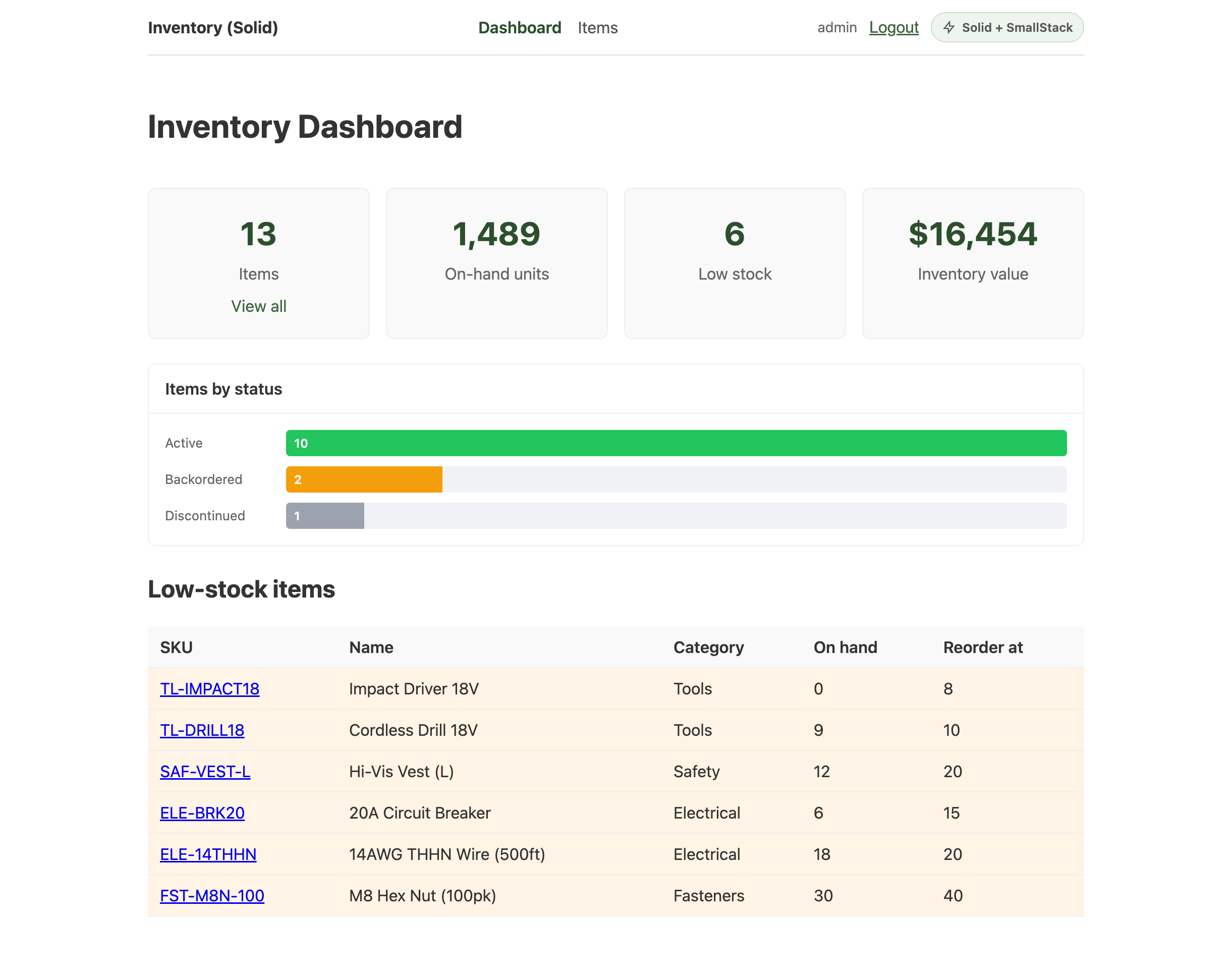
count_by and sum are computed by SmallStack; is_low_stock/stock_value arrive ready to use.
Step 6: Items list — a reactive resource
The items list drives a createResource from signals (search / status / page), so changing any
of them refetches automatically — no dependency arrays, no manual loading flags. Create
src/pages/ItemList.jsx:
import { createSignal, createResource, Show, For, Suspense } from 'solid-js'
import { api, fkName } from '../lib/api'
import Pagination from '../components/Pagination'

const STATUSES = ['active', 'discontinued', 'backordered']
const money = (v) => (v == null ? '' : `$${Number(v).toFixed(2)}`)

export default function ItemList() {
  const [search, setSearch] = createSignal('')
  const [searchInput, setSearchInput] = createSignal('')
  const [status, setStatus] = createSignal('')
  const [page, setPage] = createSignal(1)

  // The source is a function of the signals; when any changes, the fetcher re-runs.
  const query = () => ({ search: search(), status: status(), page: page() })
  const [items] = createResource(query, (q) =>
    api.items.list({
      expand: 'category,supplier', ordering: 'name', page: q.page, page_size: 10,
      q: q.search || undefined,       // search is ?q=, not ?search=
      status: q.status || undefined,
    }))

  return (
    <div>
      <div class="page-header"><h1>Items</h1><a class="btn" href="/items/new">+ New Item</a></div>
      <form class="search-form" onSubmit={(e) => { e.preventDefault(); setPage(1); setSearch(searchInput()) }}>
        <input placeholder="Search…" value={searchInput()} onInput={(e) => setSearchInput(e.currentTarget.value)} />
        <button class="btn">Search</button>
      </form>
      <div class="filters">
        <select value={status()} onChange={(e) => { setPage(1); setStatus(e.currentTarget.value) }}>
          <option value="">All statuses</option>
          <For each={STATUSES}>{(s) => <option value={s}>{s}</option>}</For>
        </select>
      </div>
      <Show when={items.error}><div class="error-box">{items.error?.message}</div></Show>
      <Suspense fallback={<p>Loading…</p>}>
        <Show when={items()}>
          <table>
            <thead><tr><th>SKU</th><th>Name</th><th>Category</th><th>Supplier</th><th>Qty</th><th>Unit $</th><th>Status</th></tr></thead>
            <tbody>
              <For each={items().results}>{(item) => (
                <tr classList={{ 'row-low-stock': item.is_low_stock }}>
                  <td><a href={`/items/${item.id}/edit`}>{item.sku}</a></td>
                  <td>{item.name}</td><td>{fkName(item.category)}</td><td>{fkName(item.supplier)}</td>
                  <td>{item.quantity}<Show when={item.is_low_stock}> <span class="badge badge-warn">low</span></Show></td>
                  <td>{money(item.unit_price)}</td><td>{item.status}</td>
                </tr>
              )}</For>
            </tbody>
          </table>
          <Pagination count={items().count} next={items().next} previous={items().previous}
            page={page()} totalPages={items().total_pages} onPageChange={setPage} />
        </Show>
      </Suspense>
    </div>
  )
}
Add a small src/components/Pagination.jsx (prev/next reading props.next/props.previous). This
is where Solid genuinely feels nicer than React for API work: no useEffect, no manual isLoading.
Step 7: The form — createStore
createStore is Solid's reactive object: setForm('name', value) updates only the inputs that read
that field. Create src/pages/ItemForm.jsx:
import { createResource, createSignal, Show, For } from 'solid-js'
import { createStore } from 'solid-js/store'
import { useParams, useNavigate } from '@solidjs/router'
import { ApiError } from 'smallstack-sdk-js'
import { api, fkId } from '../lib/api'

export default function ItemForm() {
  const params = useParams()
  const navigate = useNavigate()
  const isEdit = () => !!params.id

  const [form, setForm] = createStore({
    name: '', sku: '', category: '', bin: '', supplier: '',
    quantity: 0, reorder_threshold: 0, unit_price: '0.00', status: 'active', is_active: true, description: '',
  })
  const [fieldErrors, setFieldErrors] = createSignal({})
  const [saving, setSaving] = createSignal(false)

  const [categories] = createResource(() => api.categories.list({ page_size: 200 }).then((r) => r.results))
  const [bins] = createResource(() => api.bins.list({ page_size: 200 }).then((r) => r.results))
  const [suppliers] = createResource(() => api.suppliers.list({ page_size: 200 }).then((r) => r.results))

  // Seed from the API when editing (source = the route id).
  createResource(() => params.id, async (id) => {
    if (!id) return
    const it = await api.items.get(id)
    setForm({ name: it.name, sku: it.sku, category: String(fkId(it.category)), bin: String(fkId(it.bin)),
      supplier: it.supplier ? String(fkId(it.supplier)) : '', quantity: it.quantity,
      reorder_threshold: it.reorder_threshold, unit_price: it.unit_price, status: it.status,
      is_active: it.is_active, description: it.description || '' })
  })

  async function submit(e) {
    e.preventDefault(); setSaving(true); setFieldErrors({})
    const payload = { ...form, category: Number(form.category), bin: Number(form.bin),
      supplier: form.supplier ? Number(form.supplier) : null,
      quantity: Number(form.quantity), reorder_threshold: Number(form.reorder_threshold) }
    try {
      isEdit() ? await api.items.update(params.id, payload) : await api.items.create(payload)
      navigate('/items')
    } catch (err) {
      if (err instanceof ApiError && err.fieldErrors) setFieldErrors(err.fieldErrors)
      setSaving(false)
    }
  }
  const set = (k) => (e) => setForm(k, e.currentTarget.type === 'checkbox' ? e.currentTarget.checked : e.currentTarget.value)

  return (
    <form onSubmit={submit}>
      <h1>{isEdit() ? 'Edit Item' : 'New Item'}</h1>
      <div class="form-group"><label>Name</label><input value={form.name} onInput={set('name')} />
        <Show when={fieldErrors().name}><span class="field-error">{fieldErrors().name.join(', ')}</span></Show></div>
      <div class="form-group"><label>SKU</label><input value={form.sku} onInput={set('sku')} />
        <Show when={fieldErrors().sku}><span class="field-error">{fieldErrors().sku.join(', ')}</span></Show></div>
      <div class="form-group"><label>Category</label>
        <select value={form.category} onChange={set('category')}>
          <option value="">-- Select --</option>
          <For each={categories()}>{(c) => <option value={c.id}>{c.name}</option>}</For>
        </select></div>
      {/* …bin + supplier selects, quantity / reorder / unit_price / status, is_active checkbox — same pattern… */}
      <div class="form-actions"><button class="btn" disabled={saving()}>{saving() ? 'Saving…' : isEdit() ? 'Update' : 'Create'}</button></div>
    </form>
  )
}
ApiError.fieldErrors is a ready-made { field: [messages] } map — the SDK parsed SmallStack's
{"errors": {...}} for you.
Step 8: Badge, About, and routes
Ship the standard "Solid + SmallStack" badge (src/components/BuiltWith.jsx) linking to a public
/about page — the suite-wide "look what you get" touch. Then wire everything in src/App.jsx:
import { Router, Route, A, Navigate, useNavigate } from '@solidjs/router'
import { Show } from 'solid-js'
import { useAuth } from './lib/AuthContext'
import ProtectedRoute from './components/ProtectedRoute'
import BuiltWith from './components/BuiltWith'
import LoginPage from './pages/LoginPage'
import Dashboard from './pages/Dashboard'
import ItemList from './pages/ItemList'
import ItemForm from './pages/ItemForm'
import About from './pages/About'

function Layout(props) {
  const { user, logout } = useAuth()
  const navigate = useNavigate()
  return (
    <div class="app">
      <nav class="topnav">
        <span class="brand">Inventory (Solid)</span>
        <A href="/" end>Dashboard</A>
        <Show when={user()}><A href="/items">Items</A></Show>
        <div class="nav-right">
          <Show when={user()} fallback={<A href="/login">Login</A>}>
            <span class="nav-user">{user().username}</span>
            <button class="btn-link" onClick={async () => { await logout(); navigate('/login', { replace: true }) }}>Logout</button>
          </Show>
          <BuiltWith framework="Solid" />
        </div>
      </nav>
      <main class="content">{props.children}</main>
    </div>
  )
}

export default function App() {
  return (
    <Router root={Layout}>
      <Route path="/" component={() => <ProtectedRoute><Dashboard /></ProtectedRoute>} />
      <Route path="/about" component={About} />
      <Route path="/login" component={LoginPage} />
      <Route path="/items" component={() => <ProtectedRoute><ItemList /></ProtectedRoute>} />
      <Route path="/items/new" component={() => <ProtectedRoute><ItemForm /></ProtectedRoute>} />
      <Route path="/items/:id/edit" component={() => <ProtectedRoute><ItemForm /></ProtectedRoute>} />
      <Route path="*" component={() => <Navigate href="/" />} />
    </Router>
  )
}
Wrap it in the AuthProvider in src/index.jsx:
import { render } from 'solid-js/web'
import { AuthProvider } from './lib/AuthContext'
import App from './App'
import './index.css'

render(() => (<AuthProvider><App /></AuthProvider>), document.getElementById('root'))
Step 9: Run it
# backend on :8050 in one terminal, then:
npm run dev
Open http://localhost:5173, sign in with admin/admin (or demo/demo), and you land on the
dashboard.
Why Solid feels good here
createSignal— fine-grained state; the getter is a function you call (user()), and only the exact DOM nodes that read it update. No component re-renders, no dependency arrays.createResource— point it at a reactive source (your search/status/page signals) and it refetches automatically, tracking loading and error state. The list page has nouseEffectand no manualisLoadingboolean.createStore— a reactive object for form state; setting one field updates only its input.<Show>/<For>/<Suspense>— reactive control flow as components instead of&&/.map().
What SmallStack gives you for free
Auto REST API, Swagger/ReDoc, token auth + user management, ?q= multi-field search, ?expand= FK
expansion, ?ordering=/pagination, and server-side aggregation (?sum=, ?count_by=) powering the
dashboard — all from enable_api = True. And the client is bundled with your backend: no
npm install from a registry, always the same version as the API. See the /about page in the
running app for the full "day one" story.
Tips
- Search is
?q=, not?search=— unknown params are silently ignored. Filters (?status=) are exact. - Editing an expanded FK:
?expand=categoryreturns{id, name}; extract the id withfkId()when seeding the form. - The SDK handles the token —
persist: truerestores your session on reload; no page touches a bearer string.