
Build a Streamlit Data App on SmallStack's API
💡 Prefer the big picture first? Read the one-page Streamlit × SmallStack story — what you get for free when SmallStack is your backend — then come back and build it.
Most SmallStack frontend tutorials build a browser SPA. This one is deliberately different: a Streamlit data app written in Python, running server-side. It's the "internal tool / BI dashboard" story — and it shows that SmallStack's auto-generated API serves far more than JavaScript.
Why Streamlit is the odd one out (on purpose):
- No browser token, no
localStorage. The app runs Python on a server; the API token lives in that process, never in a user's browser. - No CORS. Calls are server-to-server (Streamlit → Django), so none of the cross-origin setup a SPA needs applies.
- The backend does the math. Metric tiles and charts come straight from SmallStack's aggregation
query params (
?sum=,?avg=,?count_by=) — you don't fetch rows to sum them.
What you'll build: a login flow, a dashboard of server-computed metrics + bar charts, an items table with server-side search, filtering, and pagination, and a public "About" page — in ~300 lines of Python.
Prerequisites: Python 3.10+ with uv, and a SmallStack backend.
Ports:
| Service | Port |
|---|---|
| Django backend | 8050 |
| Streamlit app | 8501 |
Step 1: Backend — the same inventory API
This track consumes the same inventory backend the other tutorials build. If you haven't already, stand it up (the React tutorial walks through it in full):
git clone https://github.com/emichaud/django-smallstack.git backend
cd backend
cp .env.example .env          # leave CORS_ALLOWED_ORIGINS empty — we don't need it here
make setup                    # migrate + admin/admin superuser
uv run python manage.py create_demo_user   # demo/demo, non-admin — good for a hosted preview
Add an Item model with a CRUDView (enable_api = True), giving it search_fields,
filter_fields = ["status", ...], and api_aggregate_fields = ["quantity", "unit_price"] so the
dashboard's ?sum=/?avg=/?count_by= calls work. Seed a few items, then:
make run PORT=8050
Confirm the API is live at http://localhost:8050/api/docs/.
Streamlit doesn't need CORS — but if you later serve it somewhere and also hit the API from a browser, that's when CORS matters. For this server-side app, leave it empty.
Step 2: The SmallStack Python client
SmallStack ships a Python client alongside the JS one — a single requests-based file. Copy it out
of your backend clone into a new app folder:
mkdir ../streamlit-app && cd ../streamlit-app
cp ../backend/clients/python/smallstack_client.py .
It mirrors the JS client: client.auth.login/me/logout, a generic client.api(), and a
resource() CRUD helper that raises ApiError (with .field_errors) on failure.
Create pyproject.toml:
[project]
name = "smallstack-streamlit"
version = "0.1.0"
requires-python = ">=3.10"
dependencies = ["streamlit>=1.36", "requests>=2.31", "python-dotenv>=1.0", "pandas>=2.0"]
And a dev-only .env (the token is derived from these server-side; never ship real creds this way):
SMALLSTACK_API_URL=http://localhost:8050
SMALLSTACK_USERNAME=admin
SMALLSTACK_PASSWORD=admin
Step 3: Client + login (held server-side)
Create app.py. The client is cached with @st.cache_resource so a single instance — and its token
— survives across Streamlit reruns:
from __future__ import annotations

import os
import pandas as pd
import streamlit as st
from dotenv import load_dotenv

from smallstack_client import ApiError, SmallStackClient

load_dotenv()  # read SMALLSTACK_* from .env (the client itself is env-agnostic)

st.set_page_config(page_title="SmallStack · Streamlit Data App", page_icon="📦", layout="wide")
STATUS_CHOICES = ["active", "discontinued", "backordered"]


@st.cache_resource(show_spinner=False)
def get_client() -> SmallStackClient:
    # One client (one requests.Session) shared across reruns — log in once, reuse the token.
    return SmallStackClient(os.environ.get("SMALLSTACK_API_URL", "http://localhost:8050"))


def sidebar_login(client: SmallStackClient) -> bool:
    st.sidebar.title("📦 SmallStack")
    st.sidebar.caption("Server-side Streamlit consumer")
    st.sidebar.divider()

    if client.token:                      # we have a token — but is it still valid?
        # Validate for real: /me returns the user on success, or an error body on
        # failure (e.g. the backend restarted). Don't trust a bare "we have a token"
        # check, or a dead token silently paints the dashboard with zeros.
        me = client.auth.me()
        if isinstance(me, dict) and me.get("username"):
            st.sidebar.success(f"Signed in as **{me['username']}**")
            st.sidebar.caption(f"API: `{client.base_url}`")
            if st.sidebar.button("Log out", use_container_width=True):
                get_client.clear()        # drop the cached client → fresh, unauthenticated one
                st.rerun()
            return True
        client.set_token(None)            # token rejected — drop it, fall through to login
        st.sidebar.warning("Session expired — please sign in again.")

    st.sidebar.subheader("Log in")
    with st.sidebar.form("login_form"):
        username = st.text_input("Username", value=os.environ.get("SMALLSTACK_USERNAME", "admin"))
        password = st.text_input("Password", value=os.environ.get("SMALLSTACK_PASSWORD", "admin"), type="password")
        submitted = st.form_submit_button("Log in", use_container_width=True)
    if submitted:
        try:
            client.auth.login(username, password)   # stores the token on the client
            st.rerun()
        except ApiError as exc:
            st.sidebar.error(str(exc))
    return client.token is not None
The whole security story lives here: credentials come from the environment (or the form), get exchanged for a token server-side, and the token stays on the cached client. It never reaches a browser, so there's no client-side storage to leak and no CORS surface to open.
Step 4: Data helpers — let the server aggregate
Two cached helpers. The dashboard one asks SmallStack to compute the numbers; the table one
fetches a filtered page. Add to app.py:
@st.cache_data(ttl=60, show_spinner=False)
def fetch_aggregates(_client: SmallStackClient) -> dict:
    # The backend does the math — we never pull rows to sum them. (_client isn't hashed.)
    # resource().list() RAISES ApiError on a non-2xx response, so a stale token
    # surfaces as an error the caller can handle — not a silent bag of zeros.
    items = _client.resource("/api/inventory/items")
    sum_resp = items.list(sum="quantity")
    avg_resp = items.list(avg="unit_price")
    status_resp = items.list(count_by="status")
    return {
        "total_items": sum_resp.get("count", 0),
        "total_quantity": sum_resp.get("sum_quantity", 0),
        "avg_unit_price": avg_resp.get("avg_unit_price"),
        "counts_by_status": status_resp.get("counts", {}) or {},
    }


@st.cache_data(ttl=60, show_spinner=False)
def fetch_items(_client, search, status, page, page_size) -> dict:
    params = {"expand": "category,supplier,bin", "ordering": "name",
              "page": page, "page_size": page_size}
    if search:
        params["q"] = search        # NOTE: search is ?q=, not ?search=
    if status:
        params["status"] = status
    return _client.resource("/api/inventory/items").list(**params)


def _expand_name(value) -> str:
    if isinstance(value, dict):
        return value.get("name") or str(value.get("id", ""))
    return "" if value is None else str(value)
?q=is SmallStack's multi-field search (name/SKU/description at once). Filters (?status=) are exact. Unknown params are silently ignored — so?search=would return everything.Why
resource()and notclient.api()here?api()is the low-level escape hatch — it returns the parsed body and never raises, so a401(say, an expired token after a backend restart) would sail through as{"errors": …}and.get("count", 0)would quietly become0.resource().list()raisesApiErroron any non-2xx, so auth failures surface instead of masquerading as empty data. We lean on that below to bounce the user back to the login screen.
Step 5: The dashboard
Metric tiles from the aggregation calls, plus two st.bar_charts — no plotting library, no custom
endpoint. Add to app.py:
def render_dashboard(client) -> None:
    st.header("Inventory Dashboard")
    st.caption("Every number below is computed **server-side** by SmallStack's aggregation params.")

    try:
        agg = fetch_aggregates(client)
    except ApiError as exc:
        if exc.status == 401:            # token expired mid-session → recover to login
            client.set_token(None)
            get_client.clear()
            st.rerun()
        st.error(str(exc))
        return

    c1, c2, c3, c4 = st.columns(4)
    c1.metric("Distinct items", f"{agg['total_items']:,}")
    c2.metric("Total quantity on hand", f"{int(agg['total_quantity'] or 0):,}")
    avg = agg["avg_unit_price"]
    c3.metric("Avg unit price", f"${float(avg):,.2f}" if avg else "—")
    counts = agg["counts_by_status"]
    c4.metric("Backordered", f"{counts.get('backordered', 0):,}")
    st.caption("`?sum=quantity` · `?avg=unit_price` · `?count_by=status`")
    st.divider()

    left, right = st.columns(2)
    with left:
        st.subheader("Items by status")
        if counts:
            df = pd.DataFrame({"status": list(counts), "items": list(counts.values())}).set_index("status")
            st.bar_chart(df, color="#4ade80")
    with right:
        st.subheader("Stock value by category")
        rows = fetch_items(client, "", "", 1, 200).get("results", [])
        if rows:
            df = pd.DataFrame({
                "category": [_expand_name(r.get("category")) or "—" for r in rows],
                "stock_value": [float(r.get("stock_value") or 0) for r in rows],
            })
            by_cat = df.groupby("category")["stock_value"].sum().sort_values(ascending=False)
            st.bar_chart(by_cat, color="#60a5fa")
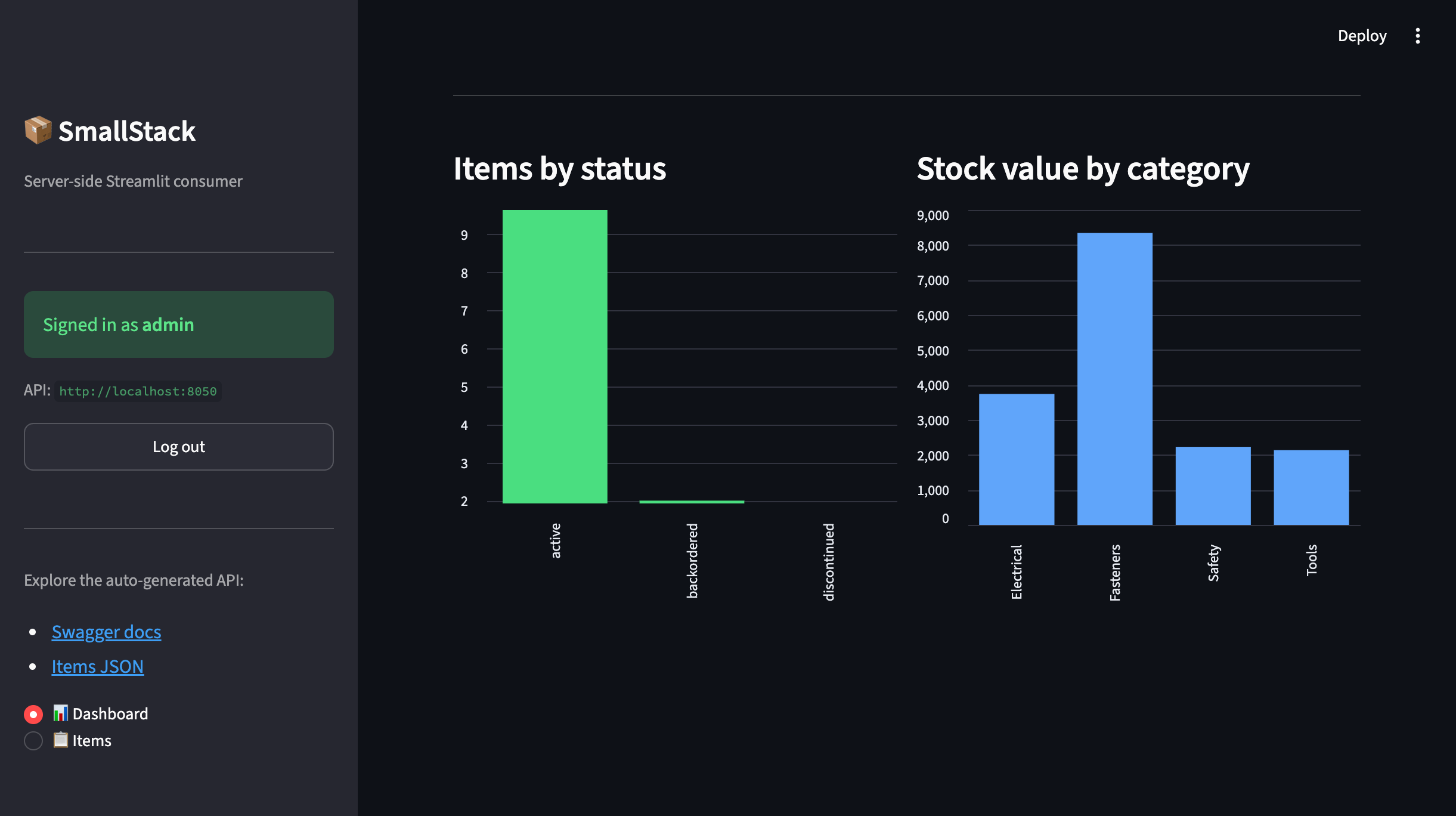
The status chart is pure aggregation. The category chart mixes a list read with a small local
rollup — handy when you want a grouping the API doesn't expose directly (and stock_value, a
backend-computed field, comes along for free in each row).
Step 6: The items table
Server-side search + status filter + pagination, rendered with st.dataframe, low-stock rows tinted:
def render_items_table(client) -> None:
    st.header("Items")
    st.caption("Search and status filter run **on the server** via `?q=` and `?status=`.")

    ctrl1, ctrl2, ctrl3 = st.columns([3, 2, 1])
    search = ctrl1.text_input("Search", placeholder="name, SKU, description…")
    status = ctrl2.selectbox("Status", ["(any)"] + STATUS_CHOICES)
    page_size = ctrl3.selectbox("Page size", [10, 25, 50, 100], index=1)
    status_param = "" if status == "(any)" else status
    page = st.session_state.get("items_page", 1)

    resp = fetch_items(client, search, status_param, page, page_size)
    rows = resp.get("results", [])
    if not rows:
        st.info("No items match those filters.")
        return

    df = pd.DataFrame([{
        "SKU": r["sku"], "Name": r["name"], "Category": _expand_name(r.get("category")),
        "Qty": r["quantity"], "Unit $": float(r["unit_price"]),
        "Stock $": float(r.get("stock_value") or 0), "Status": r["status"],
        "Low stock": bool(r.get("is_low_stock")),
    } for r in rows])

    def highlight_low(row):
        c = "background-color: rgba(248,113,113,0.18)" if row["Low stock"] else ""
        return [c] * len(row)

    st.dataframe(df.style.apply(highlight_low, axis=1)
                 .format({"Unit $": "${:,.2f}", "Stock $": "${:,.2f}"}),
                 use_container_width=True, hide_index=True)

    total_pages = resp.get("total_pages", 1) or 1
    n1, n2, n3 = st.columns([1, 2, 1])
    if n1.button("◀ Prev", disabled=page <= 1, use_container_width=True):
        st.session_state["items_page"] = page - 1; st.rerun()
    n2.markdown(f"<div style='text-align:center'>Page {page} of {total_pages} · {resp['count']:,} items</div>",
                unsafe_allow_html=True)
    if n3.button("Next ▶", disabled=page >= total_pages, use_container_width=True):
        st.session_state["items_page"] = page + 1; st.rerun()
Step 7: An About page — the day-one story
The React, Svelte, and Solid tracks each ship a /about page that explains what SmallStack hands
you for free. Give the Python track the same story — Streamlit-native, and readable without
logging in. Add to app.py:
FEATURES = [
    ("🔌 Auto REST API", "CRUD, search, filter, expand, paginate, aggregate — from one flag."),
    ("📖 Live API docs", "Swagger & ReDoc generated from your models. No YAML to hand-write."),
    ("🗂️ Themed admin", "Dashboard, CRUD pages, 5 palettes × light/dark — day one."),
    ("💓 Status + public page", "Uptime monitoring and a shareable /status page out of the box."),
    ("📥 Backups", "Scheduled SQLite snapshots with retention, one command."),
    ("🔎 Full-text search", "sqlite-fts5 search across your models, indexed automatically."),
    ("🌐 Data explorer", "Browse every registered model in the UI — no queries."),
    ("👥 Users & tokens", "Auth, user management, and self-service API tokens included."),
    ("🤖 MCP server", "AI tools + OAuth 2.0 at /mcp — Claude connects with no glue."),
    ("🚀 Kamal + Docker", "Dockerfile, compose, and Kamal deploy with automatic SSL."),
]


def render_about(client) -> None:
    b = client.base_url
    st.header("Streamlit × SmallStack")
    st.markdown(
        "You bring the **frontend** — this data app is a few hundred lines of Python. "
        "SmallStack brings **the rest**, day one: auth, admin, docs, uptime, backups, search, "
        "deploy — consumed over one REST + JSON seam with a single bearer token.")

    st.divider()
    st.subheader("What ships on day one")
    cols = st.columns(2)
    for i, (name, desc) in enumerate(FEATURES):
        cols[i % 2].markdown(f"**{name}**  \n{desc}")

    st.divider()
    st.subheader("One declaration. Every surface lights up.")
    st.code(
        'class ItemView(CRUDView):\n'
        '    model = Item\n'
        '    fields = ["name", "sku", "quantity", "unit_price", "status"]\n'
        '    search_fields = ["name", "sku"]\n'
        '    enable_api = True   # → REST + OpenAPI docs\n'
        '    enable_mcp = True   # → AI tools at /mcp', language="python")

    st.subheader("See it running — this backend, right now")
    st.markdown(
        f"[Swagger]({b}/api/docs/) · [ReDoc]({b}/api/redoc/) · "
        f"[Data explorer]({b}/smallstack/explorer/) · [Public status]({b}/status/) · "
        f"[Admin]({b}/smallstack/)")
Step 8: Wire it up and run
Finish app.py with the router. Note the About page is reachable logged-out (public story) and
as an ℹ️ About section once you're in:
def main() -> None:
    client = get_client()
    authed = sidebar_login(client)
    st.sidebar.divider()
    st.sidebar.markdown(
        f"- [Swagger docs]({client.base_url}/api/docs/)\n"
        f"- [Items JSON]({client.base_url}/api/inventory/items/)")

    if not authed:
        st.title("SmallStack · Streamlit Data App")
        st.info("👈 Log in from the sidebar. The API token lives on the server, never in a browser.")
        st.divider()
        render_about(client)             # the story is public — no login required
        return

    page = st.sidebar.radio("Section", ["📊 Dashboard", "📋 Items", "ℹ️ About"],
                            label_visibility="collapsed")
    if page == "📊 Dashboard":
        render_dashboard(client)
    elif page == "📋 Items":
        render_items_table(client)
    else:
        render_about(client)


if __name__ == "__main__":
    main()
Run it (backend on :8050 first):
uv run streamlit run app.py --server.port 8501
Open http://localhost:8501, log in from the sidebar (admin/admin or demo/demo), and the
dashboard loads with server-computed numbers.
What SmallStack gives this Python app
- Auto REST API — inventory endpoints exist with zero view code on this side.
- Server-side aggregation —
?sum=,?avg=,?count_by=feed the tiles and status chart; the database does the work, not pandas. - Rich query params for free —
?q=search,?status=filter,?expand=(FK →{id, name}),?ordering=,?page=/?page_size=— all driven straight from the UI controls. - Consistent envelope —
{count, page, total_pages, next, previous, results}makes the pager trivial. - Interactive API docs at
/api/docs/, linked from the sidebar.
Security — the right way for a server-side app
- Credentials come from the environment (or the login form), never a literal in source.
client.auth.loginexchanges them for a token held on the server-siderequests.Session.- Nothing sensitive touches the browser — Streamlit renders HTML server-side.
- For a real deployment, use
st.secrets(.streamlit/secrets.toml) or a secrets manager, and give the app a least-privilege user (the non-admindemoaccount is a good template) instead ofadmin.
Tips
- Search is
?q=, not?search=. Unknown params are silently dropped, so a wrong param returns everything. Filters (?status=) are exact single-field matches. @st.cache_resourcefor the client,@st.cache_datafor results. The client (and its token) persists across reruns; data is cached by its params with a short TTL.- Same backend, many frontends. This exact inventory API also powers the React, Svelte, and Solid tutorials — the Python consumer just proves it isn't JavaScript-only.